

Try it free
A quick meeting, live captions or the live interpreter, in your browser. No sign up, no card.
RespireSoft Meet
A meeting room with a spoken interpreter, live captions, recording and notes. Open a link and talk, no account and no download. Or build the same room into your own product with an API.
Start where you are
A quick meeting, live captions or the live interpreter, in your browser. No sign up, no card.
Sign in to run rooms with a waiting room, recording, an agenda and notes, and share them with a link.
A REST API, an embed, signed webhooks and white label, so the room carries your name.
Live interpreter
Each person picks the language they speak and the language they want to hear. The others hear you in theirs and read captions in theirs. There is no bot to invite and no app to install. The translated voice runs a few seconds behind the speaker.
A room translates into at most 5 languages at a time. The call screen is in 18 languages.
Words appear as people speak, and each line is kept with who said it and when.
The room records itself. You get the audio, the transcript and the chat as one recording, and the room keeps an agenda and notes for the next meeting.
Nothing to set up
Press Start and send the link. Nothing to install, no account for the people who join.
Choose the language you speak and the language you want to hear.
Captions and the translated voice follow, and the room can record and keep notes.
For developers
Create a room with a request, turn on captions and spoken translation as room properties, and give each person a short-lived token. Your server keeps the key and the browser only gets the token.
curl https://meet.respiresoft.com/api/v1/rooms \
  -H "Authorization: Bearer $MEET_API_KEY" \
  -H "Content-Type: application/json" \
  -d '{"name": "town-hall-1", "privacy": "private", "properties": {
        "enable_captions": true,
        "enable_translation": true,
"languages": ["es", "fr", "ar"] }}'import { Meet } from "@respiresoft/meet";
const meet = new Meet({ apiKey: process.env.MEET_API_KEY });
const room = await meet.rooms.create({
name: "town-hall-1",
privacy: "private",
properties: {
enable_captions: true,
enable_translation: true,
languages: ["es", "fr", "ar"],
},
});
const { token, url } = await meet.rooms.createToken(room.name, {
name: "Ann", role: "participant", lang: "en", ttl: 3600,
});
console.log(url); // send token and url to the browserimport os
from respiresoft_meet import Meet
meet = Meet(api_key=os.environ["MEET_API_KEY"])
room = meet.rooms.create(
name="town-hall-1",
privacy="private",
properties={"enable_captions": True, "enable_translation": True, "languages": ["es", "fr", "ar"]},
)
result = meet.rooms.create_token(room["name"], user_name="Ann", role="participant", ttl=3600)
print(result["url"]) # send result["token"] and the url to the browserThe SDK packages are not on npm or PyPI yet. The REST API works from any language over HTTPS, and every reference page has a curl example.
White label
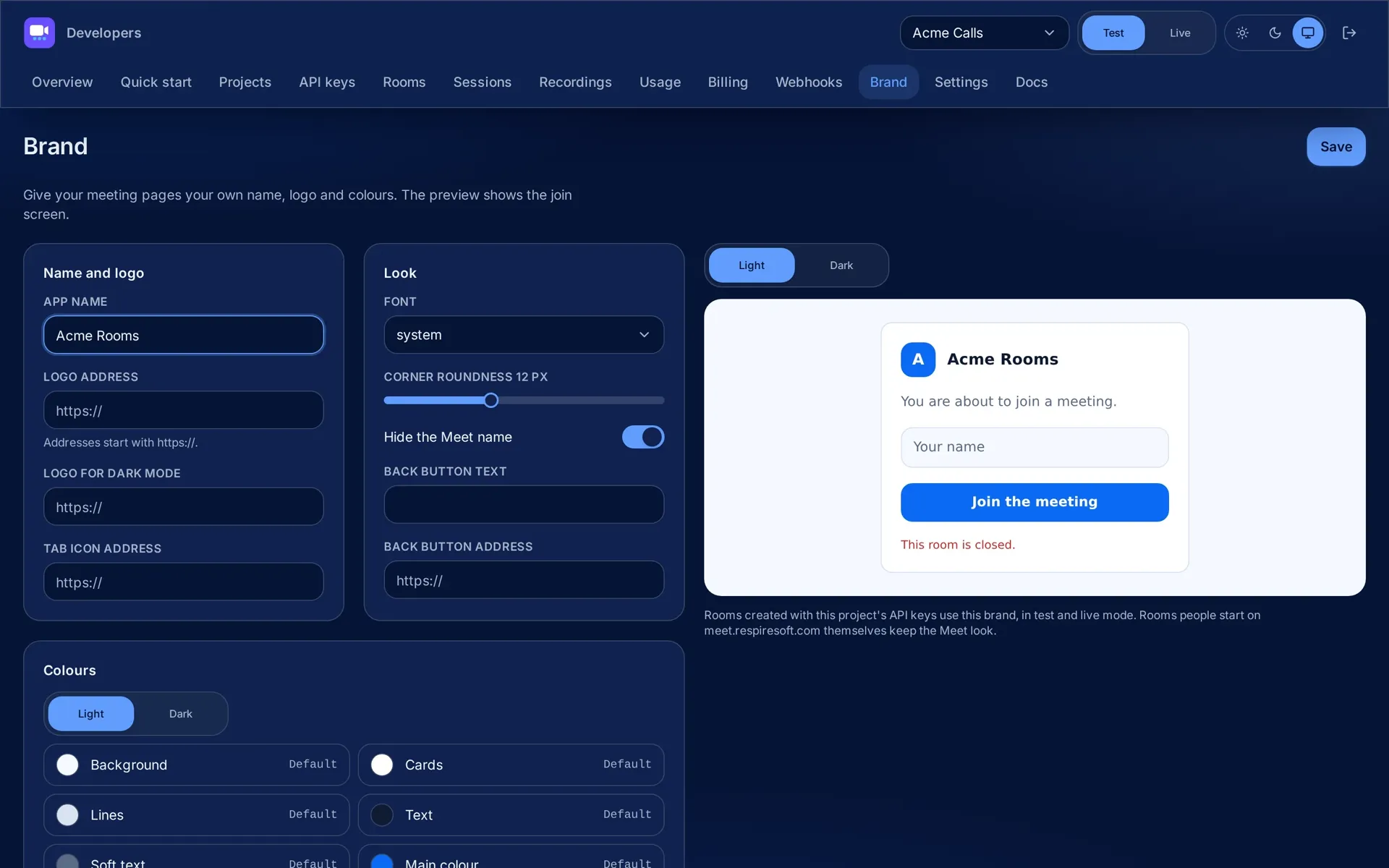
Put your logo, colours, font and domain on the call screen and the invite pages, and see the result in a live preview before you save it.
See white label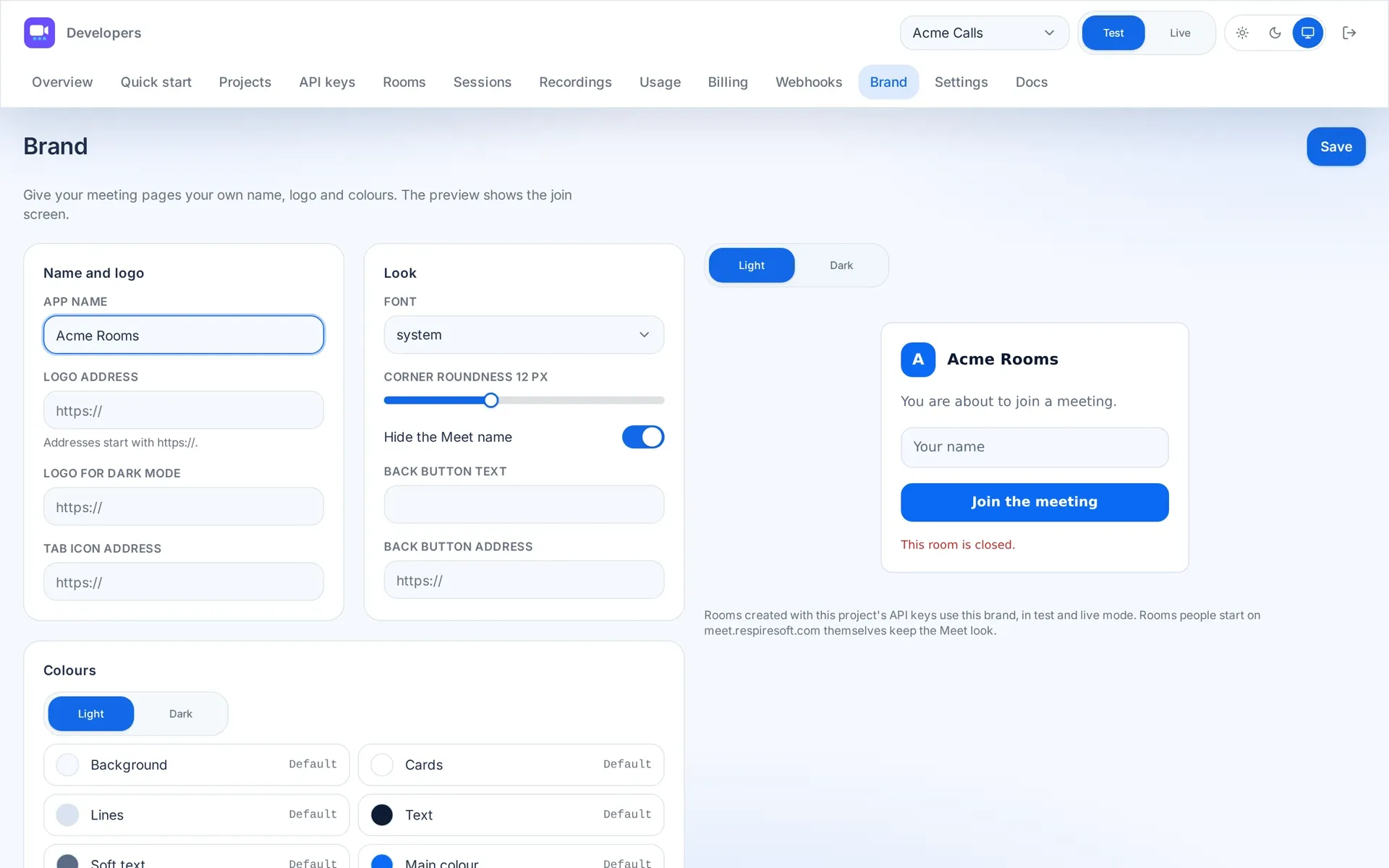
Calls run on servers in France. We say what we keep, for how long and how to delete it. We also say what we do not do: calls are not end to end encrypted.
Pricing
Prices in US dollars, checked 2026-11-01.
$0
No account, no card
20,000
participant minutes a month
$0.00025
per participant minute
Billing is on: usage in live mode is charged after the free minutes of the month.
FAQ
The free tools are free: a quick meeting, live captions and the live interpreter, with no account and no card. Each visitor gets about 10 minutes a day on each tool, and one session lasts at most 10 minutes.
If you build with the API, the first 20,000 participant minutes of every month are free for each project in live mode. After that, usage is charged at the prices on the pricing page.
No. Open a free tool, press Start and send the link. People who join do not need an account either. You only sign in to run your own rooms, recordings and API keys.
The free interpreter works in English, Spanish, French, Arabic and Persian, for up to 4 people. A room made with the API can translate into at most 5 languages, chosen from ten: English, Dutch, German, French, Spanish, Arabic, Persian, Pashto, Turkish and Urdu.
The call screen itself is available in 18 languages. We do not claim every language, and translation is done by software, so names, noise and several people talking at once can cost accuracy.
No. The interpreter and the captions run inside the meeting, so no extra guest joins and nobody has to invite one. Recording works the same way: the room records itself.
Calls run on servers in the EU, in France. Media is encrypted on its way between you and the server, but calls are not end to end encrypted, because the server has to hear the audio to caption and translate it. Recordings are kept 30 days by default, and you can delete them sooner.
Yes. Billing through the hub is live. Usage in live mode is charged after the 20,000 free participant minutes of the month. Test mode always costs $0. The pricing page has every price, with examples.
How to run a meeting across languages in 2026. What Zoom, Google Meet and Teams offer, what each plan needs, and how spoken translation and captions differ.
Checked 2026-10-31
How to pick a video call API in 2026, with dated list prices for Twilio, Daily, LiveKit, Vonage, Agora, Whereby, Stream and RespireSoft Meet API.
Checked 2026-10-31
What GDPR means for video conferencing and what Zoom, Teams, Google Meet, Whereby and Jitsi say about EU hosting, checked on 1 November 2026. Not legal advice.
Checked 2026-11-01
No account, no download. Open the free interpreter, send the link, and talk.